
GOOGLE SITES
Different, quite good, but not so easy.
With Google taking over the world, I guess it makes sense for them to have a website building tool in their portfolio.
 To get started you used to need a Gmail account, but that is no longer necessary. You can use your AOL, Yahoo or Hotmail account, or even any other e-mail you want to use. I would, however, recommend that you create a Gmail account and integrate it with your site and all the other tools that Google offers : Analytics, Adwords, Webmaster tools and the like.... so that it's easier to manage.
When you start on a new site, there's 40 languages to choose from.
- first of all you select a template, all of which are put into categories aimed at particular groups : schools and organisations, artists, business, non-profit etc... you're bound to find one that suits your needs,
- next you have to name your site as a sub-name of Google Sites (you can later change it to your own domain name which you'll have to buy somewhere else),
- then select amongst no fewer than 52 themes to determine your colors and fonts,
- add a site description so that Google knows what your site is all about (important element for SEO so put a little effort in this)
- set your privacy settings (who can see your site)
- let Google know if your site is about adult content or not (!)
- finally enter the security (spam) code and Google will set up your template for you.
Your site then presents itself to you, and it looks fairly simple : in the top right corner is a small dashboard with 3 buttons : "create page", "edit page", and "more actions".

CREATING A PAGE obviously adds a new page to your inventory. There are 4 different types of page : simple web pages where you can put your content, file cabinet pages to store all your files in various formats, announcements (news, comments, this comes pre-loaded with an RSS icon so your visitors can immediately subscribe), or list (a table with headers that can be sorted alphabetically, chronologically or numerically - quite an interesting feature).
EDITING A PAGE presents you with the tools to work on that particular page, with again 4 options to choose from : insert something (image, map, link, widget, calendar, document, presentation, video.... it's a long list of options), format to determine the fonts on the page including alignment, subscript or superscript text, bold or italic, bullet points etc...., then another button only to work with tables and set its characteristics, and finally a layout button to set columns and sidebars to position your content.
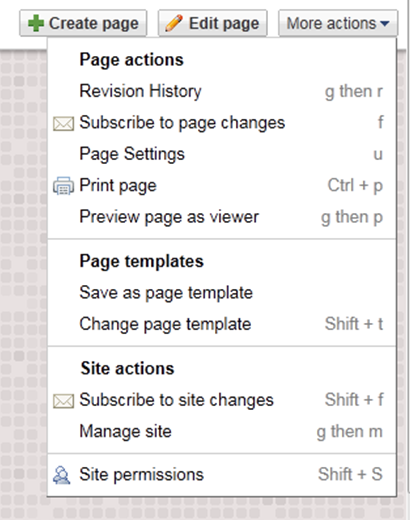 Then there's that button called "MORE ACTIONS". Clicking it delivers the page you can see on the right. It's all rather straightforward, with the most important button being near the bottom : manage site. This is where you will spend a good portion of your time to get your site right, dealing with the following categories of work :
- SITE CONTENT : where you can have a look at recent site activity (who's been on the site and what have they done), pages (your navigation structure, tree or list view, where you can re-order anything you want), attachments (list of all the documents, files and pictures that are on your site somewhere), page templates so you know what type of pages you have), application scripts if you have any, and deleted items (in case you deleted something that you want to get back).
- SITE SETTINGS : general settings such as description of your site, your Google tracking codes, or the option to simply copy your whole site, share to - well - share with your e-mail address book or the whole world or nobody at all, monetise if you want to run Google ads on your site and get paid doing so (Google operates a pay-per-click scheme, expect your return to be roughly $ 0,3 (30 cent) per click, and your click-through rate will be about 1% if your content is good. In other words if you want to earn $100 every month you will need something like 33,000 pageviews every month), and finally web address, where you can program your own domain name to be used rather than Googles's sub-domain.
- SITE APPEARANCE finally, where you can (re)-set your overall layout (arrange your content blocks and your heading), colours and fonts (page, side header, content area, sidebars etc..., quite a long list of items to control), and themes to go for a radically different template when you're tired of your current one.
CONCLUSION
I did not expect anything different : Google Sites is an excellent tool. Perhaps it hasn't got very sophisticated features, it may not be all that flashy and cool, but the fact remains that it's a good website builder with plenty of options to put your stamp on it. Consider also that it's a 100% free tool to use and that you don't have to pay for hosting, and that there does not seem to be a limit to the number of pages you can have.
Definitely recommendable.
CLICK HERE TO GO TO GOOGLE SITES
Have a look at what others did with Google sites :
MAKAURAU MARAE
KONINI PRIMARY SCHOOL
HARPIALTO
SPRING FIELD SCHOOL AND COLLEGE
THIRD WAY IT
