
WEBNODE
Very good website maker with lots of interesting features
(This website has been made with Webnode)
Webnode is the brainchild of Westcom Ltd, a company in Brno, Czech Republic. They have set up their business to be competitive in the global marketplace, and go to great lengths to accommodate as many languages as they can. This becomes apparent when you know that the back-office exists in 13 languages, and if you want to have your site in more than one language (the public side of it, that is), then there's no fewer than 60 (sixty !) to choose from. Respect !
Their main advertising concentrates on the fact that you can have a free website. This is totally correct, but naturally it means you will be somewhat limited in the functions that will be available to you. The free version does not allow you to have you own domain name, you can't have news or articles, nor a product catalogue or any assistance (that's easily remedied though, check my "website doctor" service). What's more, you can't edit the footer, have a product catalogue, and you're restricted to just 1 language. But they won't put any ads on your site and that's all to their credit. So if you just need a simple online presence, why not ?
Things start to get serious once you consider the paid-for plans. The higher you go, the bigger your site can be, the more bandwidth you can use, and the more e-mail boxes you can have. Apart from that, in terms of functionality, it goes like this :
| Plan | Price (per year) | Benefits |
| Mini | $ 59.40 | Your own domain name, premium support, add news and articles |
| Standard | $ 143.40 | Same as Mini + a product catalogue, the ability to customize the footer, possibility to publish your site in multiple languages, and password-protected pages |
| Profi | $ 299.40 | Same as Standard + backup and recovery + an offline version of your site. |
GETTING STARTED
Signing up is easy. Your e-mail serves as your login name, you select a password, which you're required to validate by clicking on the link they sent to your inbox. Next you select your template (either personal, business or e-commerce), you add your contact details, and there you go, a few seconds later your site is ready for you to edit. If you're not happy with the template you have selected, you can always change it when you want. There's plenty to choose from but they seem to be quite a lot of variations on a few basic models. Still, when you look around I'm sure you'll find one that fits the bill.
Note that you begin with a 30-day free trial of whatever version you have selected. If you then add a shop, articles or news items, you will have to switch to a paid-for plan to keep the data. If you want your site to remain free of charge then you'll lose all those items.

The dashboard is situated in the left top corner and comprises 4 main areas to work with : Items, Page, Contents and Miscellaneous :
ITEMS
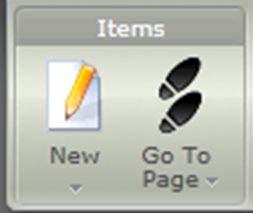 Click "new" to add a page to your site. pages are categorised in templates and can be a blank page, a page to feature articles, a FAQ page, a photo gallery or a feedback page. Name your page, determine its place in your structure, and that's it, you can edit it. Remember that changes are never published until you have clicked on a reminder button to do so. You can choose to work on your site until it's complete before actually publishing it. Clicking on "go to page" opens up the structure of your site, including your system pages, and all your article and list items. An easy way to get around your content.
 PAGES
PAGES
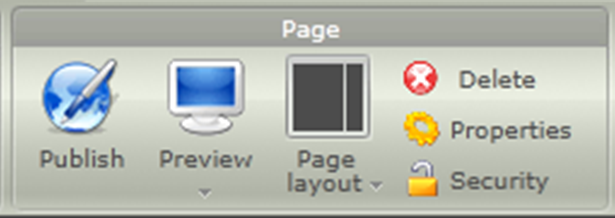
These are very simple command buttons. "Publish" is self-explanatory, you publish your site when you click it. "Preview" is also simple, it allows you to see what your site looks like without all your dashboard cluttert. "Page layout" is where you determine how the columns and rows on that particular page will be set (only 4 options, this is a bit poor). Then you have a red "delete" button which will get rid of the page if you no longer need it, a yellow "properties" button where you can program all your SEO stuff (page description and tags), and finally a "security" command to allow the page to be viewed by everybody, or by signed-in users only.
CONTENTS
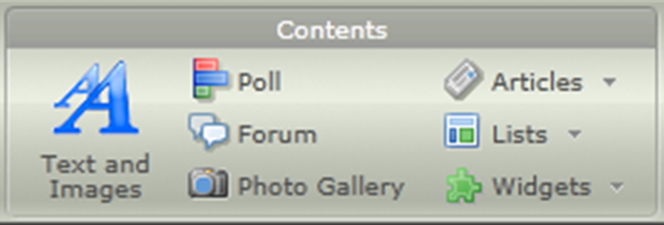 The "text and images" button allows you to add more than just text and images : it also allows you to insert videos, documents (word, excel, powerpoint and probably open source documents as well). You can obviously format your text (headers and sub-headers, bold, italic etc...), insert links to your own or external pages, or work on your HTML if required. Similarly to add a poll, a forum or a photo gallery, all you have to do is click on that particular icon and position that content element where you want it, then adjust its settings (piece of cake). Next you'll find buttons to insert articles and/or lists, which can be segmented in categories as per your needs. Finally there's a whole range of widgets including Webnode's own (FAQ and tag cloud), others relating to maps, video, photo sharing, gadgets and e-commerce tools (PayPal, Google Checkout and WorldPay). Finally there's also a widget to insert your account code when using Wufoo forms, PollDaddy or Google Adsense. All told, a wide range of possibilities for you to use.
MISCELLANEOUS
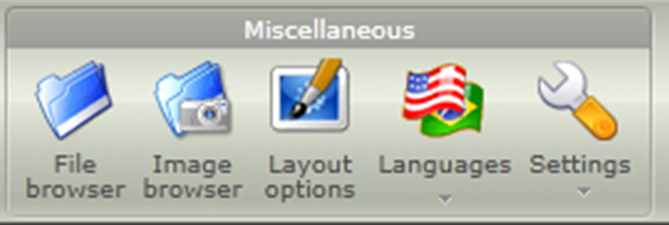 "File browser" and "Image browser" give you an overview of all the files and pictures you have uploaded from your computer to your site's Webnode's archive. This is where your file and picture uploaders are to be found, and it's also where you can organise your things in folders, edit them, or deleted if no longer needed. Your "Layout options" button takes you to the master template for your site, where basic things such as font, colors, sizes of headers and the template you're using can be changed (you have to tinker with the CSS though), and where you can edit your site header and footer, as well as your contact details. This is also the path to take to upload your website favicon, which has to be in .ico format. Here's a link to a free .ico favicon generator.
The "languages" button is your gate to starting your site in another language. Be aware that when you do this, your whole site is duplicated page for page, but when that's done both sites will live their lives separately. With this I mean that when you add a page on one version it will not automatically be duplicated on the other, and vice-versa. So if you want to have identical sites irrespective of the language you'll have to manage that. Bear in mind also that when you switch languages, you're taken to the homepage of the new language, ie there's no page-for-page similarity built in.
CONCLUSION
Webnode is not everything to everybody. It's perhaps a bit light on variety in templates, the photo module could be a bit more elaborate. Depending on what you need a site for, there may be a few more details that are not ideal for you.
